Werden Ihre Stellenanzeigen bei Google for Jobs angezeigt? Wir erklären, welche (SEO-)Maßnahmen notwendig sind, damit Ihre Job-Postings in Googles Job-Feature erscheinen.



Werden Ihre Stellenanzeigen bei Google for Jobs angezeigt? Wir erklären, welche (SEO-)Maßnahmen notwendig sind, damit Ihre Job-Postings in Googles Job-Feature erscheinen.
Google for Jobs gewinnt für das Recruiting immer mehr an Bedeutung. Kein Wunder, schließlich nutzen viele Kandidaten das Feature für die Jobsuche. Doch damit Stellenanzeigen bei Google for Jobs erscheinen, müssen sie bestimmte Voraussetzungen erfüllen und mit SEO-Maßnahmen optimal aufbereitet werden. Wir zeigen, wie Recruiter ihre Jobangebote für die Suchmaschinen-Crawler auffindbar machen.
Abonnieren Sie unseren Newsletter und erhalten Sie exklusive Recruiting-Tipps direkt per Mail.
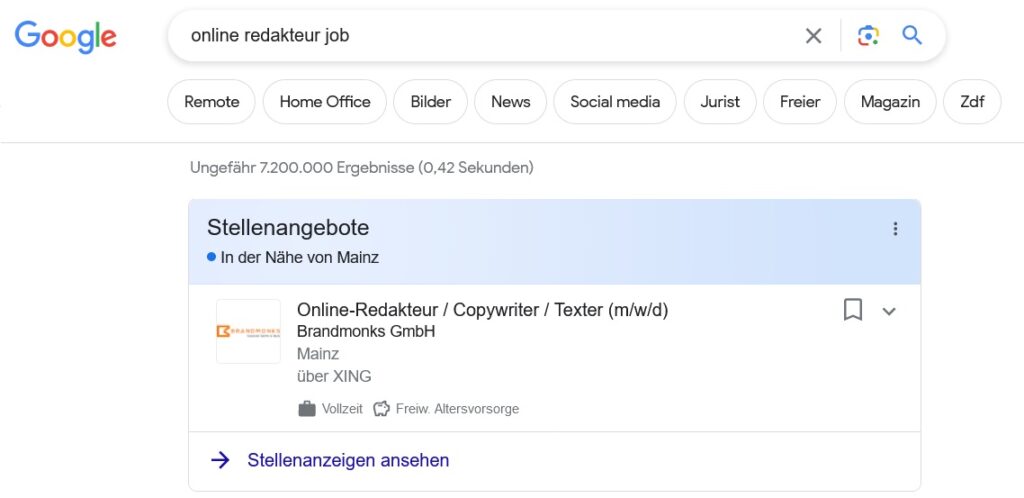
Google for Jobs ist ein Feature innerhalb der Google-Suche, das nach Stellenanzeigen sucht. Es durchforstet Jobbörsen und Karriereseiten von Websites nach Jobangeboten und präsentiert diese direkt in den Google-Suchergebnissen. Nutzer können die Angebote dann durch die Google for Jobs- Funktionen übersichtlich sortieren und bei Interesse zur entsprechenden Seite gelangen.
Bei Google for Jobs handelt es sich demnach NICHT um ein Jobportal, auf dem man (gegen Bezahlung) Stellenanzeigen veröffentlichen kann. Vielmehr bündelt das Feature Angebote aus verschiedenen Online-Quellen. Es bietet dem User die Möglichkeit, sich über die Resultate seiner Job-Suchanfrage zu informieren, ohne die einzelnen Seiten alle separat aufrufen und durchsuchen zu müssen.
Da es sich bei Google for Jobs nicht um eine klassische Jobbörse handelt – wie schaffen es Recruiter und Personaler, dass ihre Stellenanzeigen dort gelistet werden?
Um bei Google for Jobs aufzutauchen, muss die Seite mit der Jobanzeige von der Suchmaschine erstens indexiert werden und zweitens als Stellenanzeige erkannt werden. Damit das geschieht, müssen verschiedene Maßnahmen ergriffen werden.
Das Jobangebot muss im Internet über eine HTML-Website durch Google crawlbar sein. Es darf nicht als PDF-Download oder Bild eingebettet sein. Die robots.txt oder Meta-Tags dürfen die Seite nicht blockieren.
Jede Stellenanzeige muss über einen eigenen Link abrufbar sein. Eine einzelne Unterseite, auf der mehrere Jobanzeigen untergebracht sind, wird nicht in der Suchmaschinen-Job-Box landen. Die URL sollte aussagekräftig sein – entgegen vom CMS oft automatisiert generierten, kryptischen Links.
Content spielt in Sachen SEO eine wichtige Rolle, so auch für das Google for Jobs Ranking. Aussagekräftige Titel sind genauso wichtig wie passende Keywords und eine ordentliche Formatierung der Stellenanzeige.
Google for Jobs arbeitet mit strukturierten Daten vom Typ JobPosting von Schema.org. Dabei handelt es sich um semantische Hinweise an die Google-Bots, worum es auf der Seite inhaltlich geht. Die Schema-Attribute können mit Tools wie dem Schema Markup Generator erstellt und dann im HTML-Quelltext der jeweiligen Jobangebot-Seite hinterlegt werden.
Ob die strukturierten Daten korrekt eingefügt wurden, lässt sich mit Hilfe von Googles Structured Data Tool kostenfrei überprüfen.
Damit die Indexierung starten kann, muss die Seite mit dem Jobangebot gefunden werden. Um diesen Prozess zu beschleunigen, können bspw. Links von bereits indexierten Seiten auf die Stellenanzeige-URL gesetzt werden. Außerdem ist der „Abruf wie durch Google“ für die neue Unterseite mit Hilfe der Google Search Console empfehlenswert.
Wer mit seinen Stellenanzeigen bei Google for Jobs ranken möchte, kommt um die SEO-Optimierung seiner Karriere-Page bzw. der einzelnen Unterseiten nicht herum. Für Recruiter kann sich die Beschäftigung mit dieser Thematik lohnen: Googles Job-Feature hat eine riesige Reichweite und ermöglicht es, kostenfrei viel Aufmerksamkeit für ein Jobangebot zu erzielen.
(Titelbild: https://de.freepik.com/fotos-premium/das-google-logo-wird-auf-einem-smartphone-angezeigt_9294069.htm by